JavaScript is disabled. For a better experience, please enable JavaScript in your browser before proceeding.
You are using an out of date browser. It may not display this or other websites correctly.
You should upgrade or use an
alternative browser .
Cách làm chữ trong suốt trong Photoshop
Chữ trong suốt là một hiệu ứng phổ biến trong Photoshop khi thực hiện trên máy tính, giúp nội dung chữ hòa vào bối cảnh phía sau nhưng vẫn giữ được độ rõ nét và ấn tượng. Kiểu chữ này thường được dùng trong thiết kế poster, banner, ảnh nghệ thuật hoặc tiêu đề để tạo điểm nhấn tinh tế và hiện đại. Nếu bạn muốn tạo ra hiệu ứng độc đáo này nhưng chưa biết bắt đầu từ đâu, sau đây mình sẽ hướng dẫn bạn cách làm chữ trong suốt trong Photoshop đơn giản và dễ thực hiện...
Đọc bài gốc tại
đây
Đăng nhập một lần thảo luận tẹt ga
window.googletag = window.googletag || {cmd: []};
googletag.cmd.push(function() {
window.uk_delivery_1753154734465 = googletag.defineSlot('/57976558/Ureka_Supply_home.vn_Outstream_1x1_270225', [1,1], 'div-gpt-ad-1753154734465-0').addService(googletag.pubads());
googletag.pubads().enableSingleRequest();
googletag.enableServices();
googletag.display('div-gpt-ad-1753154734465-0');
});
googletag.cmd.push(function() {
if(googletag.pubads().isInitialLoadDisabled() && !window.uk_delivery_1753154734465.getResponseInformation()){
googletag.pubads().refresh([window.uk_delivery_1753154734465])
}
});
window.googletag = window.googletag || {cmd: []};
googletag.cmd.push(function() {
window.uk_delivery_1753685560510 = googletag.defineSlot('/57976558/Ureka_Supply_home.vn_InpageMB_1x1_110325', [1,1], 'div-gpt-ad-1753685560510-0').addService(googletag.pubads());
googletag.pubads().enableSingleRequest();
googletag.enableServices();
googletag.display('div-gpt-ad-1753685560510-0');
});
googletag.cmd.push(function() {
if(googletag.pubads().isInitialLoadDisabled() && !window.uk_delivery_1753685560510.getResponseInformation()){
googletag.pubads().refresh([window.uk_delivery_1753685560510])
}
});

 Đoạn Video
 Ảnh
Ảnh






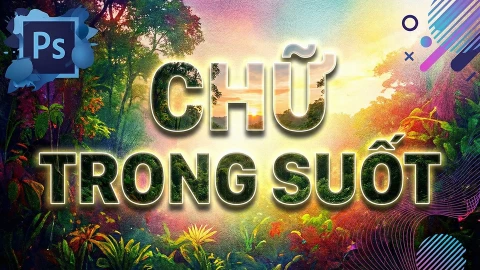 Chữ trong suốt là một hiệu ứng phổ biến trong Photoshop khi thực hiện trên máy tính, giúp nội dung chữ hòa vào bối cảnh phía sau nhưng vẫn giữ được độ rõ nét và ấn tượng. Kiểu chữ này thường được dùng trong thiết kế poster, banner, ảnh nghệ thuật hoặc tiêu đề để tạo điểm nhấn tinh tế và hiện đại. Nếu bạn muốn tạo ra hiệu ứng độc đáo này nhưng chưa biết bắt đầu từ đâu, sau đây mình sẽ hướng dẫn bạn cách làm chữ trong suốt trong Photoshop đơn giản và dễ thực hiện...